

Zapier, n8n, Taskade, Lindy, Gumloop, Airtop, Trace, Instruct, Formalini and Polylane make up this year’s shortlist of AI workflow automation tools — platforms built to actually carry out a task, not just suggest the next step. Each one connects the apps a team already relies on, triggers actions the moment something changes, and lets an AI agent handle the parts of a job that used to need someone watching over it from start to finish.

AI workflow automation software solves the problem of repetitive, multi-step work piling up across different apps: pulling data from one tool, formatting it, deciding what happens next, and pushing the result into another system without anyone copying and pasting in between. This list runs from the most broadly useful, easy-to-adopt platforms through to more specialised tools for technical teams, document-heavy workflows and engineering on-call work, so readers can match a pick to the scale, budget and complexity of what they actually need to automate, whether that is a single two-step trigger or a whole department’s worth of processes.
How we picked these AI workflow automation tools
Every tool on this list was evaluated on the same five criteria, so the ranking reflects real, day-to-day usefulness rather than flashy demos or feature checklists alone.
Related shortlists: Top 10 Ad Blockers in 2026 and Top 7 AI Notetakers in 2026.
Also worth a look: Top 7 AI Notetakers in 2026.
- Capability — how much of a real workflow the tool can complete end to end, not just the first step
- Ease of use — how quickly a new user can go from signing up to a working automation
- Pricing and value — whether the free tier or entry-level plan is genuinely useful, not just a teaser
- Reliability — how consistently the tool runs scheduled or triggered workflows without silent failures
- Who it suits — the team size, budget and technical skill level each tool is realistically built for
| Tool | Best for | Key features | Pricing | Free trial |
|---|---|---|---|---|
| Zapier | Teams and individuals who want to connect everyday apps and automate routine tasks without writing code. | App integrations, Multi-step Zaps, Built-in AI | Free — 100 tasks/month, two-step Zaps | 14-day free trial of Professional, no credit card required |
| n8n | Technical teams that want deep customization and the option to self-host their automations. | Visual workflow builder, Code when needed, Self-hosting | Starter — €20/month billed annually, 2.5K executions | Free trial of Pro features, no credit card required |
| Taskade | Teams that want one workspace combining AI agents, task management and automation. | AI agents, Living workspace, No-code automations | Free — 6,000 starter credits, up to 3 AI apps | Free plan, no credit card required |
| Lindy | Teams that want an AI employee to handle interrupt-driven, repetitive work. | AI teammate, Tool connections, Prebuilt templates | Plus — $29.99/month per user, 3,000 credits | First week free for new teammates added via Slack |
| Gumloop | Teams that want to design complex AI automations visually without writing code. | Visual automation builder, Pre-built nodes, Scheduled runs | Pricing on request — see Gumloop's pricing page for current plans | — |
| Airtop | Teams that need an AI agent to log in, browse and extract data from websites. | Plain-English agents, Browser-based automation, Data extraction | Free — 1,000 credits, 3 simultaneous sessions | Free plan, no credit card required |
| Trace | Teams blending human and AI work who want routine tasks automated without losing oversight. | Task routing, Tool connections, Automation discovery | Pricing on request — free options available, see Trace for current plans | — |
| Instruct | Non-technical users who want to automate work by describing it in plain language. | Natural-language agents, No-code editing, Reusable agents | Pricing on request — see Instruct's website for current plans | — |
| Formalini | Teams that need to convert paperwork and scans into clean, structured data. | Document extraction, Personal Vault, Export formats | Free — 25 pages once, 100 MB storage | Free plan, no credit card required |
| Polylane | Engineering teams that want AI agents to monitor code and infrastructure so nobody has to be on call. | Code monitoring, Infrastructure checks, Automated fixes | Free — 2 team members, 2 cloud accounts, 10 PR reviews/month | Free plan, no credit card required |
The best AI workflow automation tools in 2026
1. Zapier
Connect your apps and automate workflows.

Zapier is best for: Teams and individuals who want to connect everyday apps and automate routine tasks without writing code.
The most established name in app-to-app automation, with the widest range of integrations and the gentlest learning curve.
Key Zapier features
- App integrations — connects 5,000+ apps including Gmail, Slack and Salesforce
- Multi-step Zaps — chain triggers and actions across tools without code
- Built-in AI — Zapier Agents and Chatbots automate decisions inside workflows
- Tables and Interfaces — store data and build simple apps alongside automations
- Templates — thousands of pre-built workflows to start from
Zapier pricing
- Free — 100 tasks/month, two-step Zaps
- Professional — from $49/month billed annually
- Team — from $69/month billed annually
- Enterprise — custom pricing
- Free trial: 14-day free trial of Professional, no credit card required
2. n8n
Workflow automation for technical people.

n8n is best for: Technical teams that want deep customization and the option to self-host their automations.
Pairs a visual builder with real code access, so technical teams can go far beyond simple triggers.
Key n8n features
- Visual workflow builder — drag-and-drop canvas with 400+ integrations
- Code when needed — add JavaScript or Python steps inside any workflow
- Self-hosting — run on your own infrastructure for full data control
- AI agent nodes — build AI-powered steps directly into automations
- Community templates — thousands of shared workflows to start from
n8n pricing
- Starter — €20/month billed annually, 2.5K executions
- Pro — €50/month billed annually, 10K executions
- Business — €667/month billed annually, self-hosted
- Enterprise — custom pricing
- Free trial: Free trial of Pro features, no credit card required
3. Taskade
One prompt. One app. One living workspace for teams.
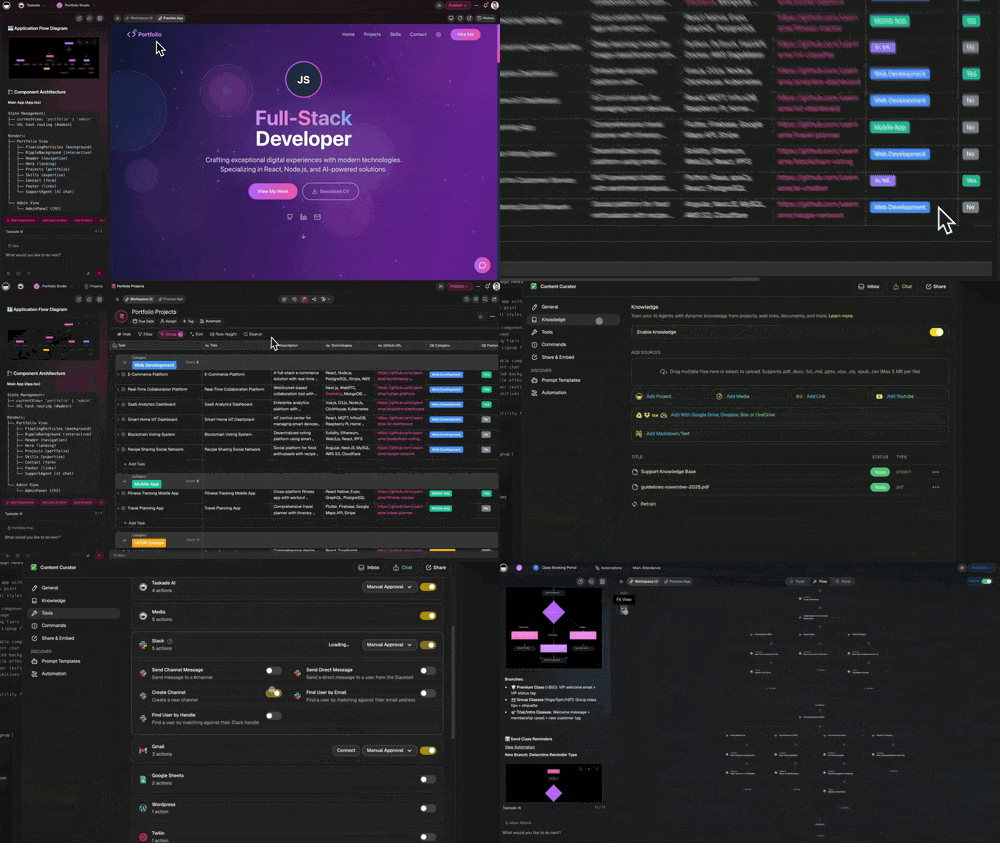
Taskade is best for: Teams that want one workspace combining AI agents, task management and automation.
Blends project management with AI agents, so automation sits alongside the team's everyday work.
Key Taskade features
- AI agents — build custom agents that think, plan and act on tasks
- Living workspace — docs, tasks and chat combined in one view
- No-code automations — trigger actions from a single prompt
- Team collaboration — shared projects with real-time editing
- Dashboards and tools — assemble mini apps powered by AI
Taskade pricing
- Free — 6,000 starter credits, up to 3 AI apps
- Pro — $10/month billed annually, 50,000 AI credits
- Business — $25/month billed annually, 150,000 AI credits
- Enterprise — custom pricing
- Free trial: Free plan, no credit card required
4. Lindy
The AI teammate that lets you do more.

Lindy is best for: Teams that want an AI employee to handle interrupt-driven, repetitive work.
Framed around an AI teammate rather than a workflow canvas, which suits teams who think in tasks, not triggers.
Key Lindy features
- AI teammate — builds agents that handle recurring tasks automatically
- Tool connections — links to your calendar, inbox and CRM
- Prebuilt templates — launch common automations in minutes
- Credit-based usage — scales with how much work Lindy handles
- Enterprise controls — security and admin options on higher tiers
Lindy pricing
- Plus — $29.99/month per user, 3,000 credits
- Pro — $99.99/month per user, 15,000 credits
- Max — $199.99/month per user, 35,000 credits
- Enterprise — custom pricing
- Free trial: First week free for new teammates added via Slack
5. Gumloop
Automate any workflow with AI.

Gumloop is best for: Teams that want to design complex AI automations visually without writing code.
A visual-first builder for teams who want to design AI automations the way they'd sketch a flowchart.
Key Gumloop features
- Visual automation builder — drag-and-drop canvas for AI workflows
- Pre-built nodes — connect popular apps and AI models without code
- Scheduled runs — automations trigger on a timer or external event
- Team sharing — publish workflows for colleagues to reuse
- API and integrations — plug automations into existing tools
Gumloop pricing
- Pricing on request — see Gumloop's pricing page for current plans
6. Airtop
Automate your work with just words.

Airtop is best for: Teams that need an AI agent to log in, browse and extract data from websites.
Purpose-built for tasks that live inside a web browser, from logins to data pulls.
Key Airtop features
- Plain-English agents — describe a task and Airtop carries it out
- Browser-based automation — logs in and navigates sites like a person
- Data extraction — pulls structured data from any web page
- Session management — runs multiple browser sessions in parallel
- Credit-based plans — scale usage up or down as needed
Airtop pricing
- Free — 1,000 credits, 3 simultaneous sessions
- Starter — $29/month, 30,000+ credits
- Professional — $189/month, 225,000+ credits
- Enterprise — $558/month and up
- Free trial: Free plan, no credit card required
7. Trace
Workflow automations for the human and AI workforce.

Trace is best for: Teams blending human and AI work who want routine tasks automated without losing oversight.
Keeps a human in the loop by routing tasks between people and AI agents rather than replacing either.
Key Trace features
- Task routing — sends work to the right human or AI agent
- Tool connections — integrates with Slack, Jira and Notion
- Automation discovery — surfaces repetitive work worth automating
- Embedded agents — AI handles routine steps inside existing tools
Trace pricing
- Pricing on request — free options available, see Trace for current plans
8. Instruct
The most capable way to automate your work.

Instruct is best for: Non-technical users who want to automate work by describing it in plain language.
Leans on plain-language instructions rather than a canvas, which suits first-time automation builders.
Key Instruct features
- Natural-language agents — describe a task and Instruct builds it
- No-code editing — adjust agent behavior without writing code
- Reusable agents — save and rerun automations on demand
- Fast setup — explain the task once and let the agent handle it
Instruct pricing
- Pricing on request — see Instruct's website for current plans
9. Formalini
Turn any document into structured data.

Formalini is best for: Teams that need to convert paperwork and scans into clean, structured data.
A focused pick for anyone whose workflow starts with messy paperwork rather than clean app data.
Key Formalini features
- Document extraction — turns PDFs, scans and photos into structured data
- Personal Vault — organizes documents and extracts data automatically
- Export formats — outputs to JSON, Excel and tables
- Enterprise integrations — connects to UiPath, SAP and Salesforce
- MCP server — lets AI agents query documents directly
Formalini pricing
- Free — 25 pages once, 100 MB storage
- Developer — €5/month, 200 pages monthly
- Starter — €14/month, 1,000 pages monthly
- Business — €49/month, 5,000 pages monthly
- Free trial: Free plan, no credit card required
10. Polylane
AI agent that monitors your code so you're not on call.

Polylane is best for: Engineering teams that want AI agents to monitor code and infrastructure so nobody has to be on call.
The most specialised tool on this list, aimed squarely at engineering teams rather than general operations.
Key Polylane features
- Code monitoring — AI agents watch your codebase for issues
- Infrastructure checks — tracks production systems around the clock
- Automated fixes — resolves common issues before they need a human
- PR reviews — agents review pull requests automatically
- Credit pooling — usage scales with team size and activity
Polylane pricing
- Free — 2 team members, 2 cloud accounts, 10 PR reviews/month
- Starter — $80/month, 5 cloud accounts, 500 PR reviews/month
- Team — $200/month, 2,000 PR reviews/month
- Enterprise — custom pricing
- Free trial: Free plan, no credit card required
Which AI workflow automation tool should you choose?
For teams that want the broadest set of app connections with the least setup, Zapier remains the easiest starting point, while n8n suits technical teams that want to self-host, inspect every step, or write custom logic into their automations. Taskade and Lindy both work well for teams that want an AI agent handling ongoing, interrupt-driven work rather than one-off triggers, and Gumloop and Airtop are strong picks for anyone building more visual or browser-based automations from scratch without waiting on a developer.
Smaller, more specialised jobs are better served by focused tools: Trace and Instruct suit teams blending human and AI work on the apps they already use, like Slack and Jira, Formalini is the clear choice for anyone automating document and paperwork-heavy workflows, and Polylane is built specifically for engineering teams that want AI agents monitoring code and infrastructure around the clock so fewer people need to be on call. Whichever pick fits best, starting with a free plan or trial is the fastest way to confirm it handles the actual workflow before committing to a paid tier.


