

Windy, OpenSnow, Weather Fit, Weather in your Calendar, Shadowmap, Lazy Weather app and WeatherMind GPT make up a well-rounded shortlist of weather apps for reading the sky in 2026. Between them they cover professional-grade forecasting, ski and snow conditions, outfit planning, calendar-synced daily updates, solar shadow mapping, a minimalist relative-weather view and weather’s effect on mood, so most of what a forecast actually needs to do is covered.

Weather apps solve very different problems depending on who’s asking: a pilot or sailor needs layered, professional-grade data, a skier needs a storm forecast written by someone who understands mountains, and most people just want to know whether to grab a jacket. This list runs from the broadest, most capable tools down to sharper specialists, so it’s easy to match a pick to whatever the day actually calls for, whether that’s planning a flight or deciding what to wear to work.
How we picked these weather apps
Every app on this list was judged against the same five criteria, so the ranking reflects genuine usefulness for reading the weather rather than name recognition alone.
Related shortlists: 10 Best Maps and GPS Apps in 2026 and Top 10 Flight Booking Apps in 2026.
Also worth a look: Top 7 Short-Term Rental Platforms in 2026 and Top 10 Maps and GPS Apps in 2026.
- Capability — how much of the forecasting problem the app actually solves
- Ease of use — how quickly it turns a forecast into a decision
- Pricing and value — what’s free, and what a paid tier actually adds
- Reliability — consistency of data across regions and conditions
- Who it suits — the kind of user or situation each app is genuinely built for
| Tool | Best for | Key features | Pricing | Free trial |
|---|---|---|---|---|
| Windy | Outdoor professionals — kiters, sailors, pilots and paragliders — who need detailed, layered forecasts. | Animated weather map, Spot forecasts, Aviation data | Free to use — interactive weather maps, forecasts and aviation data | Free plan |
| OpenSnow | Skiers, riders and mountain travelers who plan trips around snow conditions and storm timing. | Daily snow forecasts, 10-day comparison, Snow reports | Free account with basic forecasts and snow reports | Free trial, no credit card required |
| Weather Fit | Anyone who wants a quick outfit recommendation instead of interpreting a forecast themselves. | Avatar outfit view, Current, daily and tomorrow views, Homescreen widget | Free core app — forecasts, outfit recommendations and one widget | Free plan |
| Weather in your Calendar | People who live in their calendar and would rather see the forecast next to their meetings than open a separate app. | 16-day forecast, Emoji icons, Works everywhere | Free to use — 16-day forecast synced to your calendar | Free plan |
| Shadowmap | Photographers, real estate professionals and planners who need to know exactly where the sun and shadows fall. | 3D shadow simulation, Worldwide coverage, Golden hour planning | Free — core 3D shadow and sunlight maps | Free plan |
| Lazy Weather app | Anyone who wants a one-glance read on the day rather than a list of numbers to interpret. | Relative comparison, Minimalist interface, Homescreen widget | Free to use — relative weather comparisons and widget | Free plan |
| WeatherMind GPT | People who notice their mood shifting with the seasons and want a structured way to explore the connection. | Problem-specific surveys, Personalized strategies, Mobile and desktop access | Free self-assessment tool and surveys | Free plan |
The best weather apps in 2026
1. Windy
No. 1 Professional Weather App

Windy is best for: Outdoor professionals — kiters, sailors, pilots and paragliders — who need detailed, layered forecasts.
Its layered maps and multiple forecast models make it the most complete option for anyone who needs more than a daily high and low.
Key Windy features
- Animated weather map — worldwide wind, rain and temperature layers in motion
- Spot forecasts — precise hour-by-hour conditions for any location
- Aviation data — METAR, TAF and NOTAMs for airports worldwide
- Multiple forecast models — compare outputs from several models side by side
- Custom layers — toggle waves, air quality, snow cover and more
Windy pricing
- Free to use — interactive weather maps, forecasts and aviation data
- Windy Premium — pricing on request (removes ads, unlocks extra features)
- Free trial: Free plan
2. OpenSnow
The best weather forecasts, snow reports, and ski conditions

OpenSnow is best for: Skiers, riders and mountain travelers who plan trips around snow conditions and storm timing.
The written forecaster analysis alongside the raw data is what separates it from apps that only show numbers.
Key OpenSnow features
- Daily snow forecasts — written analysis from regional forecasters, not just raw data
- 10-day comparison — stacks multiple models to judge forecast confidence
- Snow reports — base depth and recent snowfall for resorts worldwide
- High-resolution maps — track storms before they arrive
- Custom alerts — notified once snow totals hit a chosen threshold
OpenSnow pricing
- Free account with basic forecasts and snow reports
- Base — $49.99/year individual, $89.99/year family
- Premium — $99.99/year individual, $179.99/year family
- Free trial: Free trial, no credit card required
3. Weather Fit
Answers the oh-so difficult question, 'what to wear?'

Weather Fit is best for: Anyone who wants a quick outfit recommendation instead of interpreting a forecast themselves.
Translating a forecast into an outfit removes the extra interpretation step most weather apps leave to the user.
Key Weather Fit features
- Avatar outfit view — a character dresses for the day's actual conditions
- Current, daily and tomorrow views — plan an outfit a day ahead
- Homescreen widget — a glance before heading out the door
- Weather maps and radar — standard forecast data alongside the outfit view
- Customizable character — adjust the avatar to match personal style
Weather Fit pricing
- Free core app — forecasts, outfit recommendations and one widget
- Premium subscription — unlocks extra widgets, landscapes and unlimited wardrobe items
- Free trial: Free plan
4. Weather in your Calendar
Get the local weather forecast with icons in your calendar

Weather in your Calendar is best for: People who live in their calendar and would rather see the forecast next to their meetings than open a separate app.
Putting the forecast inside an app people already check constantly removes a whole extra app from the daily routine.
Key Weather in your Calendar features
- 16-day forecast — daily weather synced straight into the calendar
- Emoji icons — a quick visual read of each day's conditions
- Works everywhere — Google Calendar, Apple Calendar and Outlook
- Subscribed feed — updates automatically once set up
- Any city — forecasts generated for a chosen location worldwide
Weather in your Calendar pricing
- Free to use — 16-day forecast synced to your calendar
- Optional donations accepted by the creator
- Free trial: Free plan
5. Shadowmap
Interactive 3D maps app to visualize solar shadows worldwide
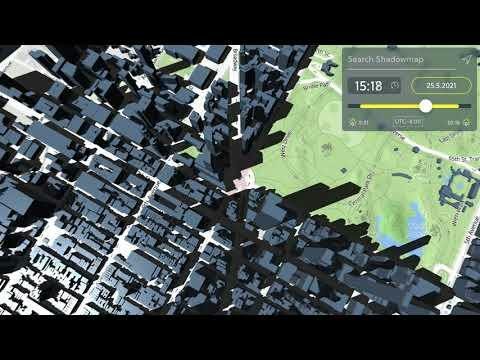
Shadowmap is best for: Photographers, real estate professionals and planners who need to know exactly where the sun and shadows fall.
Turning sun position into a visual shadow map is a genuinely different way to plan around the weather than a standard forecast.
Key Shadowmap features
- 3D shadow simulation — see shadow patterns for any time and date
- Worldwide coverage — built on global 3D building and terrain data
- Golden hour planning — find the best light for a shoot in advance
- Real estate insight — check a property's sun exposure before buying
- Renewable energy use — estimate solar potential for a site
Shadowmap pricing
- Free — core 3D shadow and sunlight maps
- Shadowmap Pro — $99 per year
- Free trial: Free plan
6. Lazy Weather app
The simplest most useful weather app so far

Lazy Weather app is best for: Anyone who wants a one-glance read on the day rather than a list of numbers to interpret.
Comparing today to yesterday instead of showing a raw temperature is a small change that makes a forecast easier to act on.
Key Lazy Weather app features
- Relative comparison — shows today against yesterday instead of raw numbers
- Minimalist interface — one screen, no extra taps
- Homescreen widget — check conditions without opening the app
- Plain-language read — colder, warmer or about the same
Lazy Weather app pricing
- Free to use — relative weather comparisons and widget
- Free trial: Free plan
7. WeatherMind GPT
Explore how weather affects your mental health

WeatherMind GPT is best for: People who notice their mood shifting with the seasons and want a structured way to explore the connection.
A narrower tool than a forecast app, but a useful add-on for anyone who already suspects the weather affects how they feel.
Key WeatherMind GPT features
- Problem-specific surveys — short self-assessments tied to weather patterns
- Personalized strategies — suggestions based on survey answers
- Mobile and desktop access — usable from any browser
- No sign-up friction — accessible as a simple hosted page
WeatherMind GPT pricing
- Free self-assessment tool and surveys
- Free trial: Free plan
Which weather app should you choose?
Anyone who needs serious, layered forecast data — pilots, sailors, kiters or paragliders — should make Windy the default, since its animated maps and multiple forecast models cover far more than a daily high and low. Skiers and mountain travelers planning a trip around snow should lean on OpenSnow‘s written storm analysis instead, and anyone who would rather see an outfit than a temperature should let Weather Fit dress its avatar for the day.
People who live inside their calendar should let Weather in your Calendar put the forecast where it will actually get seen, while photographers, real estate professionals and planners who care about exactly where the sun falls should reach for Shadowmap‘s 3D shadow maps. Anyone who finds raw numbers hard to act on can try Lazy Weather app‘s relative comparisons instead, and readers curious whether their mood tracks the forecast have a simple starting point in WeatherMind GPT. Pairing one all-purpose forecaster like Windy with a specialist suited to a specific need covers nearly every weather question without adding much complexity, and because most of this list is free to start with, there’s little reason to settle for a single do-everything app that handles no single job particularly well.


